
Moodle with a durian flavour. From Malaysia with love. Moodle and Durian. Moodle Malaysia Boleh!
Showing posts with label wall. Show all posts
Showing posts with label wall. Show all posts
Thursday, January 1, 2015


Saturday, December 20, 2014
The Moodle Wall just got better - My Christmas gift to the Moodle community. Merry Christmas!
The Moodle Wall just got better - My Christmas 2014 gift to the Moodle community. Merry Christmas!
 |
| Source: https://unknowncystic.files.wordpress.com/2011/12/xmas-gift.jpg |
The Moodle Wall for Moodle 2.x just got better. Much better. And the best part is that, in the spirit of Christmas and Open Source, I am giving away the prized source code to all Moodle developers and students. For free. You are free to modify the source code as long as you give credit to two persons: Srivinas Tamada of India, and Frankie Kam of Malaysia. And as long as you fulfil a list of requirements from me. More on that list at the end of this post.
For now let me take you on a tour of the FIVE improvements of the Wall.

Friday, October 10, 2014
Wall for Moodle 2.x has been enhanced with easier Youtube and TED video embeds
 |
| Photo by Troy Tolley Source: http://goo.gl/VIX5aj |
Introduction
I had last blogged about the Moodle Wall here in 2013. That was a long time ago. I recently decided to update the Wall for Moodle 2.x. So on a rainy day on 12th October 2014, I set out to make it a little bit better. Hope you like the changes that follow.
Monday, August 26, 2013
Facebook-like Wall For Moodle 1.9x and 2.x is now freely available as Open Source to the Community
 |
| Image by Troy Tolley. Creative Commons Attribution-NoDerivs 2.0 Generic. See Source. |
What's the method to my 'madness' of giving a portion of my hard work away for free? I'm giving the code to the community is to see a better Wall emerge from the Crowd of Moodle developers or students or users. Please take the Wall code to new heights for the benefit of the Moodle worldwide community. Be brave, be gentle, be innovative, be creative. Cheers!
 |
| The Wall in action on my Moodle 2.5 site. There's also a Moodle 1.9 version. Both are free - NOW. |
It's been fun developing the Srinivas' Tamada's original non-Moodlerised Wall script 3.0 to where it is now, but now it's time for the rest to take over with the coding of the Moodle Wall. Please make it jump though hoops. Perhaps you can make the Wall posts update in realtime using AJAX. I couldn't. Perhaps you can improve the GUI of the Wall. I haven't got the time. Please share it back to the Moodle Community.
Have fun!
Sunday, June 30, 2013
Ten Moodle Wow Factors! All together now, let's say "Fuiyoh!"


I'm compiling a list of Ten Moodle Wow Factors. In Malaysia, we say "Fuiyoh!" instead of "Wow". So this post is called the Fuiyoh Factor. My goal in this post, and over the next one month, to identify at least ten things about a Moodle coursepage that are awe-inspiring, foot-tapping, finger-snapping, jaw-dropping, all-singing-all-dancing and simply bodacious to Moodle newbies. Specifically, English language teachers.
If you had a choice of presenting three of your favourite things about Moodle to excite a crowd who have never used Moodle before, which three things would you choose? Raindrops on roses and whiskers on kittens. Bright copper kettle and warm woolen mittens?
"Things that you can with Moodle" to me include what's inside Moodle, and what you can achieve by linking Moodle with outside Web or Internet services either via embed codes or other means. If I miss any Moodley stuff with a Wow Factor, please shout it out on the rooftops by commenting in the comments section.
Before I continue with my list, I would like to say that Moodle and its collective code by the Community is already a HUGE Wow Factor. Every piece of code written by a developer, enthusiast or teacher is already a gift and a gem to educators and students worldwide. I salute all coders, testers, end users and students who have given their time and effort in creating the world's best and most-used Learning Management System. Okay, here we go then. In no particular order.
Friday, February 8, 2013
Making Moodle more SOCIAL and FUN.
Making Moodle More Social and Fun
I presented this at University Malaya on Thursday 7th February 2012. Hope you enjoy the tips.
Thanks for viewing. Any comments?
Frankie Kam
I presented this at University Malaya on Thursday 7th February 2012. Hope you enjoy the tips.
Thanks for viewing. Any comments?
Frankie Kam
Thursday, January 10, 2013
Here it is - my FREE Limited-Features Version of the Wall for Moodle 2.x
Dear All
I am releasing a free version -and- limited-features version of the wall for Moodle 2.x. This wall has been tested under Moodle 2.2. You can download it, try to install it. If you succeed, you are a Moodle-PHP Guru. If not, you can always E-mail me, right? If you successfully set it up on your Moodle site, you are free to modify or customise it. This wall is a modification of Srinivas Tamada's Facebook-like Wall Script 3.0 which is free.

I am releasing a free version -and- limited-features version of the wall for Moodle 2.x. This wall has been tested under Moodle 2.2. You can download it, try to install it. If you succeed, you are a Moodle-PHP Guru. If not, you can always E-mail me, right? If you successfully set it up on your Moodle site, you are free to modify or customise it. This wall is a modification of Srinivas Tamada's Facebook-like Wall Script 3.0 which is free.
Sunday, December 30, 2012
Journal-like feature of the Wall - ensuring privacy of students' posts
I made this one before the New Year deadline. Notch up one more feature for the ever-versatile Wonderwall on the checklist. I have added a "Moodle Journal"-like Wall feature. This means that there is added level of privacy for students. The Teacher can also ask questions and a student responds without the benefit of seeing/viewing other students' answers/responses. Works like the Moodle 1.9 Journal mod. Sort of.
Using the parameter in the iframe code,
the student only can see messages on the wall that were posted by himself or the Course Administrator. Works pretty much the same as Moodle 1.9's venerable Journal mod. In this manner, the student enjoys a degree of privacy. His or her wall posts are hidden from other student users. Of course the Course Administatrator can view and reply to all wall posts from all students.
Check it out on:
http://www.moodurian.com/mod/resource/view.php?id=4326
Username: studentscm -or- me
Password: studentscm -or- me
Attached PNG screenshots hopefullly are self-explanatory.

Summary: now the Wall has Journal feature which hides other students' posts from any student user. The student user only sees Wall updates from himself/herself/Course Administrator/Teacher. Student now enjoys a level of privacy. The teacher can remove the &Journal=1 parameter, or change it to &Journal=0 to revert the Wall to all-see-all content type of default wall.
What do you think of this feature?
Regards
Frankie Kam
P.S., Move your mouse cursor over the grayed-out avatar user account pic to see a nice effect.
Using the parameter in the iframe code,
&Journal=1
the student only can see messages on the wall that were posted by himself or the Course Administrator. Works pretty much the same as Moodle 1.9's venerable Journal mod. In this manner, the student enjoys a degree of privacy. His or her wall posts are hidden from other student users. Of course the Course Administatrator can view and reply to all wall posts from all students.
Check it out on:
http://www.moodurian.com/mod/resource/view.php?id=4326
Username: studentscm -or- me
Password: studentscm -or- me
Attached PNG screenshots hopefullly are self-explanatory.
 |
| The Wall with the parameter : &Journal=0 Everyone sees everyone's posts |

Summary: now the Wall has Journal feature which hides other students' posts from any student user. The student user only sees Wall updates from himself/herself/Course Administrator/Teacher. Student now enjoys a level of privacy. The teacher can remove the &Journal=1 parameter, or change it to &Journal=0 to revert the Wall to all-see-all content type of default wall.
What do you think of this feature?
Regards
Frankie Kam
P.S., Move your mouse cursor over the grayed-out avatar user account pic to see a nice effect.
Gamification and the Moodle Wonderwall.
I figured out the how to include sentence statistics and have added in a gamification element/dimension to the Wall. It's getting more interesting.
I. Giving feedback with word statistics for a Wall post.
I thought that it might be useful if the number of words, sentences per post and the average words per sentences might be useful information to be shown after each Wall post.

Try this out:
Username: studentscm
Password: studentscm
My iframe embed code is:
<iframe width="90%" scrolling="auto" height="700px" frameborder="0" align="middle" name="Embedded Frame" src="http://www.moodurian.com/
The interpretation is this: the teacher has told the class that his/her expectation is that every post to the wall must meet a minimum number of 10 words, and must have a minimum number of 3 sentences. Those posts to the Wall that meet these two criteria will be rewarded with an icon each (gamification element here).
 |
| The student is awarded this stamp If he or she meets the minimum words per sentence average. |

The student is awarded this stamp If he or she
meets the minimum number of sentences in the post.
Check it out. I've done it. That's a whole new element to the Wall. Lots of possibilities to create visual cues to the teacher as to who did what and who didn't achieve what. And lots of possibilities for students to be rewarded with stamps and icons and stuff for meeting the teacher's requirements/expectations.
Every heard of the Flesch-Kincard Readbility score?

I also surfed over to these sites:
http://www.readability-score.
and implemented the Flesch-Kincaid Readability score test on the Wall.
(The website www.readability-score.com uses the PHP code available from https://github.com/
So anyway, the readability scores translate as follows:
| Flesch Reading Ease Score | Flesch-Kincaid Grade Level | Typical age | Style description |
|---|---|---|---|
| Elementary School * | |||
| 1 | 6-7 | ||
| 2 | 7-8 | ||
| 3 | 8-9 | ||
| 4 | 9-10 | ||
| Middle school * | |||
| 90 to 100 | 5 | 10-11 | very easy |
| 80 to 90 | 6 | 11-12 | easy |
| 70 to 80 | 7 | 12-13 | fairly easy |
| 60 to 70 | 8 | 13-14 | standard |
| High school * | |||
| 60 to 70 | 9 | 14-15 | standard |
| 50 to 60 | 10 | 15-16 | fairly difficult |
| 50 to 60 | 11 | 16-17 | fairly difficult |
| 50 to 60 | 12 | 17-18 | fairly difficult |
| Post-secondary education (College or University) * | |||
| 30 to 40 | 13 | 18-19 | difficult |
| 30 to 40 | 14 | 19-20 | difficult |
| 30 to 40 | 15 | 20-21 | difficult |
| 30 to 40 | 16 | 21-22 | difficult |
| Graduate education * | |||
| 0 to 30 | 22+ | very difficult | |
Source:
Here's a simplified scale of the scores.
if($n >= 90) return "Very easy";
else if($n >= 80) return "Easy";
else if($n >= 70) return "Fairly easy";
else if($n >= 60) return "Standard";
else if($n >= 50) return "Fairly difficult";
else if($n >= 30) return "Difficult";
else return "Very confusing";
I dumbed it down a bit, since I only have five icons (see attached gifs!), to this
slightly simplified structure:
80-100 : Very Easy
70-89 : Easy
50-69 : Standard
20-49 : Difficult
0-19 : Very Difficult
I programmed the PHP function from the github link into message_ajax.php of the Wall and you can take a look at the screenshot after a typical post. Mouseover your mouse cursor onto the icons and you have a nice popup text description.

So now, you have not only a numeric Readability score, you also have a set of visual colourful icons to indicate the level of readability of the student's wall post.
BTW, I tried the following speeches on the Wall, and here are the results:
Obama's speech at the memorial wake in Newtown, Connecticut = high 90s
Queen Elisabeth I's speech = low 40s
So the Flesch-Kincaid readability algorithm does seem to work fine.
The php code from the github link also allows me to program these readability scores functionality into the Wall:
* Flesch Kincaid Reading Ease
* Flesch Kincaid Grade Level
* Gunning Fog Score
* Coleman Liau Index
* SMOG Index
* Automated Reability Index
The same code also can give:
* String length
* Letter count
* Syllable count
* Sentence count
* Average words per sentence
* Average syllables per word
Summary: I've added in visual cues to a student's post so that both the teacher and student will know if the post meets the teacher's expectations. In addition, a readability score is added to the post.
I'm sure that the Gamified Wall can be useful in language classes where feedback is important.
Regards
Frankie Kam
Friday, December 21, 2012
Send E-mail notifications with every update to your Moodle Wall
Good news. I managed to get each Wall post to send an automatic E-mail message to the E-mail account of Moodle user N. This feature is useful so that the lecturer or teacher can receive updates of Wall posts from students. Here's a sample use-case.
Step1. The user copies a section of a website and pastes it as a Wall update.

Step2. I check my E-mail account and notice that the user "Mr Student" has posted something on the Moodle Wall. Hmm...let's check it out.

Step 4. Email is opened. Guess what? The E-mail that was sent from the Wall is in HTML format. Oh, wow! Great Scott and great stuff.

I think that this feature is useful for busy lecturers and teachers. The advantage is that one need not surf to the Wall to read the messages. The messages will fly into your E-mail account. The 'drawback' is that you might experience information overload when there are many student posts to the wall.
This E-mail notification only works with message posts, not with comment posts.
Postscript: initially, my Gmail account tagged the E-mail message as spam. So I had to dig into my Gmail's spam folder to mark as "Not Spam" the message.
Happy Moodling
Frankie Kam
Step1. The user copies a section of a website and pastes it as a Wall update.

Step2. I check my E-mail account and notice that the user "Mr Student" has posted something on the Moodle Wall. Hmm...let's check it out.

Step 4. Email is opened. Guess what? The E-mail that was sent from the Wall is in HTML format. Oh, wow! Great Scott and great stuff.

I think that this feature is useful for busy lecturers and teachers. The advantage is that one need not surf to the Wall to read the messages. The messages will fly into your E-mail account. The 'drawback' is that you might experience information overload when there are many student posts to the wall.
This E-mail notification only works with message posts, not with comment posts.
Postscript: initially, my Gmail account tagged the E-mail message as spam. So I had to dig into my Gmail's spam folder to mark as "Not Spam" the message.
Happy Moodling
Frankie Kam
Wednesday, December 19, 2012
The Moodle WonderWall (Facebook-like Wall) with Unicode (UTF-8 Encoding)
With the help of Waldemar Fiszer, the Wall now displays text in Unicode UTF-8. What this means is that I can display other language texts on in posts to the wall. So the Wall now becomes a sort of United Nations.
For example:
UTF-8 unicode encoding is supported. Below I have posted in various languages: Japanese, Russian, Vietnamese, Chinese, Arabic, Hebrew, and here's some French:
Bienvenue ! Vous êtes nouveau ? perdu ? Lisez ceci !
ムードル)は機能が豊富で、かつオープンソースで無料の教育管理ソフトです。
Форум "Методика и стратегия дистанционного обучения" на infoco.ru
Phiên bản Moodle 2.4 chính thức được phát hành với một số tính năng mớ:
在您参与社区讨论之前请注意一下几点:
وايضا اذا كانت لديكم اية تجارب سابقة وتريدون تبدال الخبرات مع المطورين يمكنكم مناقشتها في منتدى المطورين
מניסיוני יש לא מעט אתגרים בשימוש בעברית בתוכנות שונות, ומודל כמערכת מורכבת במיוחד היא לא יוצאת מהכלל.
Try it out here:

Moodle 1.9 version of the Wall
http://www.moodurian.com/course/view.php?id=38
Username: studentscm
Password: studentscm
And here:

Moodle 2.3.2 version of the Wall
http://www.moodurian.com/m232/mod/page/view.php?id=3
Just use Guest access
Go ahead, give it a try. If you are interested to setup your own "International" Wonderwall on your Moodle 1.9.x or Moodle 2.x production site, please do not hesitate to contact me at: boonsengkam@gmail.com
Until the next time, Happy Moodling!
Frankie Kam
Frankie Kam
Sunday, November 25, 2012
The WonderWall for Moodle evolves with Like and Dislike buttons.
No, I'm not talking about the FB Like icon. In this post, I'm announcing that I have added Like and Dislike buttons to the Wonderwall.

Live site:
http://www.moodurian.com/mod/resource/view.php?id=4278
Username: studentscm
Password: studentscm
Now that each post comes with user interactivity, this raises the usefulness of the Wall to a whole new level. That of community interaction. Many thanks to the brilliant William Thomas of Wctdesigns for his post that saved me much time and effort. Thanks mate!
Give it a try. Available for now only for Moodle 1.9.
Frankie Kam
Live site:
http://www.moodurian.com/mod/resource/view.php?id=4278
Username: studentscm
Password: studentscm
Now that each post comes with user interactivity, this raises the usefulness of the Wall to a whole new level. That of community interaction. Many thanks to the brilliant William Thomas of Wctdesigns for his post that saved me much time and effort. Thanks mate!
Give it a try. Available for now only for Moodle 1.9.
Frankie Kam
Sunday, November 18, 2012
WunderbarWall For Your Moodle 1.9 Site - First Look
Hi All
Here's my latest work on the WunderbarWall, erm, I mean, WonderWall for Moodle 1.9. Moodle 2.x users, please be patient. I haven't yet ported over the code. Latest version of the Wall is as shown below in these three images. Now with the Nicedit integration into the WonderWall, you can do straight copy and paste from websites and the multmedia updates can be posted directly onto the Wall.
Everyday, I'mshufflin' toggling!
I figured out to integrate Nicedit with Moodle and to toggle between Nicedit's rich editor and HTML's humble and under-rated Textarea.
So what are you waiting for? Head over to my Moodle production site for a live demo:
http://www.moodurian.com/mod/resource/view.php?id=4267
Username: studentscm
Password: studentscm
Grafitti Wall
Finally for today, I created a Grafitti Wall on my Moodle site. You can use the Nicedit editor to post creative updates to my Grafitti Wall. Please be gentle and be mindful to post only polite messages!
http://www.moodurian.com/mod/resource/view.php?id=4268
Username: studentscm
Password: studentscm
If you are interested to have a Wonder/WunderbarWall installed on your Moodle 1.9 / 2.x production site, just send me an E-mail. Code and installation charges apply.
Frankie Kam
Here's my latest work on the WunderbarWall, erm, I mean, WonderWall for Moodle 1.9. Moodle 2.x users, please be patient. I haven't yet ported over the code. Latest version of the Wall is as shown below in these three images. Now with the Nicedit integration into the WonderWall, you can do straight copy and paste from websites and the multmedia updates can be posted directly onto the Wall.
Everyday, I'm
I figured out to integrate Nicedit with Moodle and to toggle between Nicedit's rich editor and HTML's humble and under-rated Textarea.
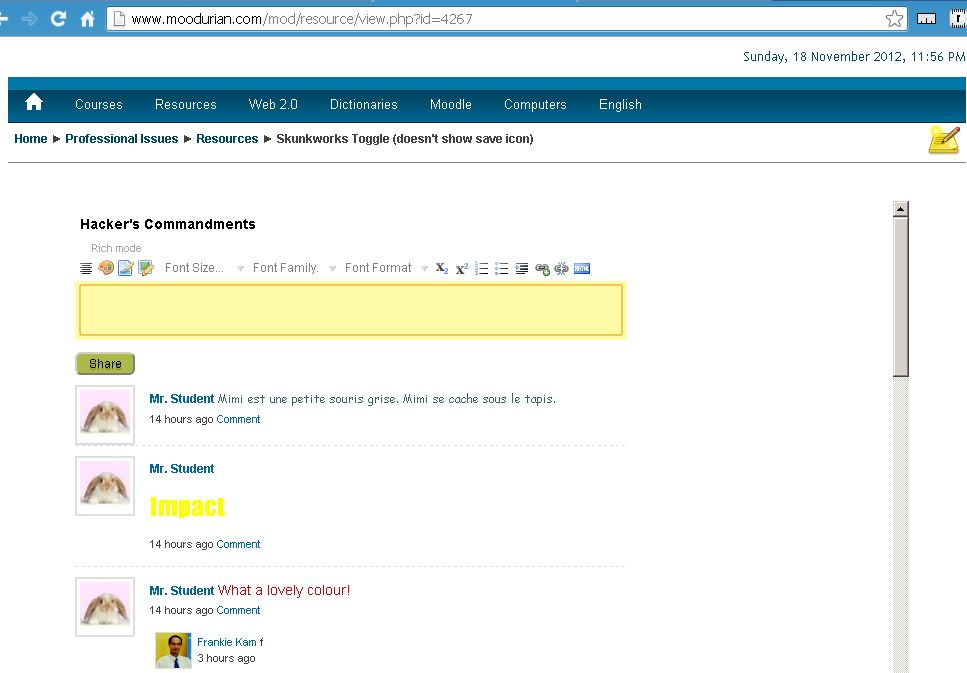 |
| Figure 1. Nicedit Rich Text editor integration. |
 |
| Figure 1. Toggling between the Nicedit Rich Text editor and the normal standard HTML Textarea. |
 |
| Figure 3. The Wall allows you to copy-and-paste media rich content from other websites. Again, this is possible thanks to Nicedit. Not bad for a rich text editor (2009) that is no longer in development! |
So what are you waiting for? Head over to my Moodle production site for a live demo:
http://www.moodurian.com/mod/resource/view.php?id=4267
Username: studentscm
Password: studentscm
Grafitti Wall
Finally for today, I created a Grafitti Wall on my Moodle site. You can use the Nicedit editor to post creative updates to my Grafitti Wall. Please be gentle and be mindful to post only polite messages!
http://www.moodurian.com/mod/resource/view.php?id=4268
Username: studentscm
Password: studentscm
 |
| Figure 4. Check out the Grafitti Wall. |
Now that's what I call art!
 |
| Figure 5. The Rich Editor allows you to post colorful messages onto the Wall. Go ahead, try your hand at creative sentences and words. |
 |
| Figure 6. The Wall also features special Gafitti Fonts that you can use to spice up the Wall! |
If you are interested to have a Wonder/WunderbarWall installed on your Moodle 1.9 / 2.x production site, just send me an E-mail. Code and installation charges apply.
Frankie Kam
Thursday, November 15, 2012
Nicedit your Moodle 1.9/2.x Wall for a truly WonderWall!
Hi Ya'll
I couldn't resist sharing this. I have managed to integrate the Nicedit rich text editor with the Wonderwall for Moodle 1.9 and Moodle 2.2.
What this means is, now, I can post RICH TEXT updates onto the wall. What's rich text? Imagine multi-coloured, multi-sized and multi-font updates on the wall. How does this sound to you?
I. Nicedit Wonderwall Integration - Moodle 1.9.x

I've managed to integrated a rich-text editor, NicEdit, with the WonderWall.
http://www.moodurian.com/mod/resource/view.php?id=4264
Username: studentscm
Password: studentscm
Messages now allow for, amongst other things,
1. Multicoloured (for creative messages)
2. Multiformatted
3. full embed code of
a. Youtube
b. Vimeo
c. Google Maps
d. Scribd
e. Slideshare
4. Embedding of image URLs

II. Nicedit Wonderwall Integration - Moodle 2.x
Users of Moodle 2.x can also benefit from the wall as a cool, creative and innovative pedagogical tool for online classes or E-Learning. I've ported the code over to my Moodle 2.2 production site. It should also work on Moodle 2.3.

III. Icons on the Nicedit panel
I managed to also reduce the distraction of the icons on the Nicedit panel. I did this in several ways.
(1) Reduce the colour contrast of the icons - they now look more cloudy with a grayish hue.
(2) Reduced the number of icons displayed (I had to edit the nicEdit.js file to do this)
(3) Reduced the font colour of the display text of the Font Size, Family and Style drop-down selection boxes

The result is a customised Nicedit panel, that looks like the image above. I changed the textarea colour to yellow so that it would match the on-focus dark yellow border. I also wanted to focus the user on the edit box, not on the icons. The icons have been intentionally dimmed to achieve a minimalistic, low-profile and less conspicuous look. Al this whilst maintaining an almost full edit functionality.
Interested in setting up your own Wonderwall? I'm selling the copies of the Wall code, if you are interested.
Well, that's all for now. Until we meet again, have fun exploring the new textarea edit box with the NicEdit
icons.
regards
Frankie Kam
Wednesday, October 24, 2012
Before I die I want to .... (Virtual Moodle Reflection Wall)
Art imitates life. Specifically, simulating a "Before I die" physical wall with a Wonderwall. I don't think that this has ever been done before - combining a Facebook-like Wall with a forum discussion topic. Well, there's a first time for everything. I am 'dying' to see what you will say...I mean type....
You can access the Wonderwall here:
Username: studentscm
Password: studentscm

Think, reflect and type in your thoughts. You can also copy and paste a http://url that ends with a gif, jpg or png file to embed an image. Or you can also paste a http://youtubeUrl if you want to. Have fun with the wall!
And here's another example of the use of the Wall. This time with larger fonts (as specified in the file wall.css).

You can access the Wonderwall here:
Username: studentscm
Password: studentscm
Regards
Frankie Kam
APPENDIX
How did I do this?
I discovered how to add a background image to the Wonderwall.
You can do it too! Here's the embed code. You can put it inside a forum discussion topic.
<h1>Reflection Wall</h1><br /><center><iframe width="200%" allowtransparency="true" name="main" style="opacity: 1; background-image: url(http://www.moodurian.com/mod/forum/bricks.jpg); " scrolling="auto" height="1000px" frameborder="0" align="left" src="http://www.moodurian.com/wall_resource/index.php?CourseId=37&Id=1&Desc=Before I die I want to ..." marginheight="5px" marginwidth="5px"></iframe></center>
You also have to upload the image file bricks.jpg to your /mod/forum folder. The rest is magic!
To get your own wall for Moodle 1.9 or Moodle 2.x, click here.
To get your own wall for Moodle 1.9 or Moodle 2.x, click here.
Sunday, October 21, 2012
Wallify your Moodle 2.x Coursepage
The Wonderwall now works in Moodle 2.2!
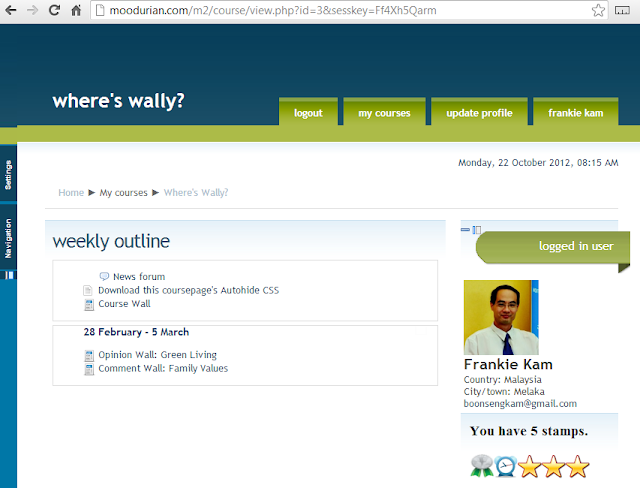
Clicking on the Course Wall

It's written for Moodle 2.x.
More to come soon. Wait for it!
Demo site:
http://moodurian.com/m2/course/view.php?id=3
Username: student
Password: student
-or-
Username: me
Password: me
-or-
Username: Create your own
Password: Create your own
VARIOUS WAYS OF USING THE WALL FOR LEARNING!
1. Embed a simple non-hyperlink text.
Hello World!

2. Embed a simple URL hyperlink
www.google.com
Note: for many of the embed input below, omitting the "http" part will transform the input into a hyperlink that when clicked, opens the link in a new browser tab.

3. Embed an image from a URL
http://media.themalaysianinsider.com/images/uploads/css/tmi-qr-logo-244-80x78.gif

4. Embed a Voicethread
https://voicethread.com/share/1484117/

5. Embed a slideshare presentation
http://www.slideshare.net/14807466

6. Embed a Youtube video
http://www.youtube.com/watch?v=xOToL-SSkKI&feature=fvst
or
http://youtu.be/xOToL-SSkKI

7. Embed a Scribd document
http://www.scribd.com/doc/106792255

8. Embed a Vimeo video
http://vimeo.com/36707211

9. Embed a TED.com video - presentations at their best
http://www.ted.com/talks/kent_larson_brilliant_designs_to_fit_more_people_in_every_city.html

10. Embed a TeacherTube video - education
http://teachertube.com/viewVideo.php?video_id=159879

11. Embed a Chatbotmaker interactive video URL http://www.chatbotmaker.com/videofiles/01/mp4/index.html
-or-
http://www.labodanglais.com/videofiles/01/mp4/index.html


12. Embed a Chatbotmaker interactive MP3 session URL
http://www.chatbotmaker.com/voicefiles/01/index.html
-or-
http://www.labodanglais.com/voicefiles/job/01/index.html
 13. Embed a manual checklist

14. Embed a program's source code (etc. C++ or Java) - maintains indentation and whitespace!

Is your favourite Web2.0 social media embed code missing? Let me know!
Summary
Moodle 1.9 code (zip file) for USD$49
Moodle 2.x code (zip file) for USD$49
Code comes with basic setup instructions.
After payment is made, the code will be sent to you within 48hours.
Installation fees add another USD$49.
Frankie Kam
E-mail me at: boonsengkam@gmail.com

Clicking on the Course Wall

It's written for Moodle 2.x.
More to come soon. Wait for it!
Demo site:
http://moodurian.com/m2/course/view.php?id=3
Username: student
Password: student
-or-
Username: me
Password: me
-or-
Username: Create your own
Password: Create your own
Live Wall
VARIOUS WAYS OF USING THE WALL FOR LEARNING!
1. Embed a simple non-hyperlink text.
Hello World!

2. Embed a simple URL hyperlink
www.google.com
Note: for many of the embed input below, omitting the "http" part will transform the input into a hyperlink that when clicked, opens the link in a new browser tab.

3. Embed an image from a URL
http://media.themalaysianinsider.com/images/uploads/css/tmi-qr-logo-244-80x78.gif


https://voicethread.com/share/1484117/

5. Embed a slideshare presentation
http://www.slideshare.net/14807466

6. Embed a Youtube video
http://www.youtube.com/watch?v=xOToL-SSkKI&feature=fvst
or
http://youtu.be/xOToL-SSkKI

7. Embed a Scribd document
http://www.scribd.com/doc/106792255

8. Embed a Vimeo video
http://vimeo.com/36707211

9. Embed a TED.com video - presentations at their best
http://www.ted.com/talks/kent_larson_brilliant_designs_to_fit_more_people_in_every_city.html

10. Embed a TeacherTube video - education
http://teachertube.com/viewVideo.php?video_id=159879

11. Embed a Chatbotmaker interactive video URL http://www.chatbotmaker.com/videofiles/01/mp4/index.html
-or-
http://www.labodanglais.com/videofiles/01/mp4/index.html


12. Embed a Chatbotmaker interactive MP3 session URL
http://www.chatbotmaker.com/voicefiles/01/index.html
-or-
http://www.labodanglais.com/voicefiles/job/01/index.html


14. Embed a program's source code (etc. C++ or Java) - maintains indentation and whitespace!

Is your favourite Web2.0 social media embed code missing? Let me know!
 |
 |
Moodle 1.9 code (zip file) for USD$49
Moodle 2.x code (zip file) for USD$49
Code comes with basic setup instructions.
After payment is made, the code will be sent to you within 48hours.
Installation fees add another USD$49.
Frankie Kam
E-mail me at: boonsengkam@gmail.com
Subscribe to:
Posts (Atom)