Pages

Showing posts with label folders. Show all posts

Tuesday, May 5, 2015

Enable the Lightbox effect for an image file inside a Folder resource on your Moodle site

Folders by Colleen  Galvin, on Flickr
Source; https://www.flickr.com/photos/col233/7974661195

I am having fun implementing the Lightbox javascript effects on images on my Moodle site. It was just yesterday that I realised that I could upload image files into a Moodle folder resource, but when I clicked on an image file, the file downloaded instead of loading up on-screen. It was then that I decided to see if I could make a clicked file link open up on-screen with the Lightbox effect. I am happy to say that I have succeeded to do so, albeit with a hack or two.

Here is my Moodle folder resource.
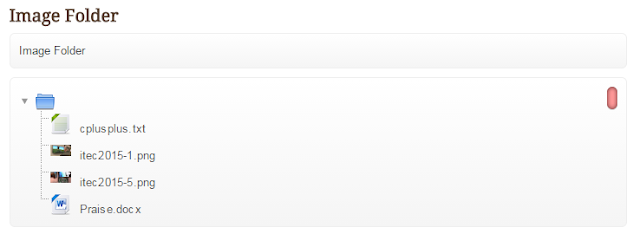
Figure 1. A normal-looking folder containing 2 image files, 1 text file and 1 Ms Word file.
Nothing out of the ordinary here....

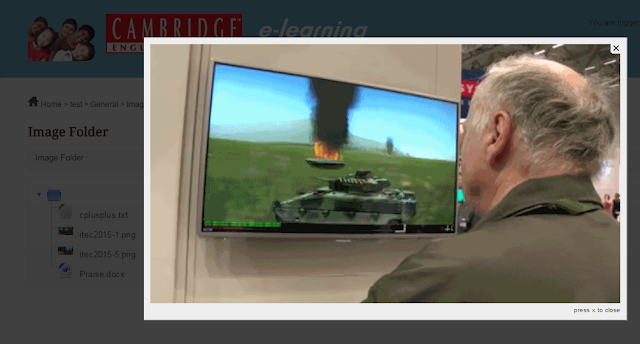
Figure 2. What happens when the file itec2015-1.png is clicked.
Whoa! It's a lightbox image effect. Click the 'x' to close.

Thursday, April 30, 2015

How to selectively hide individual files that are contained inside a Moodle folder resource


Pixabay. License: CC0 Public Domain.
Free for commercial use / No attribution required


Does the structure below look familiar to you? Have you ever used a Folder resource in Moodle? If you have then you will know that you can hide an entire folder by restricting access. However, you cannot selectively hide and show different files within the folder.


Can you hide just the file named GA01 Ver1.0 Service Tracking Form.pdf from the tree? I think not!

In Moodle 2.7.2 until Moodle 2.8.5, you are not able to hide from view, an individual file that is put inside a Moodle folder resource. However, I needed to to this. Desperately. Thus I sought to find the answers on Moodle.org. Alas, no one had come up with an answer. Only questions.  I threw myself into the work with gusto. After four days, I had cracked the problem. I am sharing my solution in this post. 

The Learning Outcome of this post is you will know how to hide from a user, individual files inside a Moodle folder.

Ratings and Recommendations by outbrain