Pages

Wednesday, December 19, 2012

The Moodle WonderWall (Facebook-like Wall) with Unicode (UTF-8 Encoding)


With the help of Waldemar Fiszer, the Wall now displays text in Unicode UTF-8. What this means is that I can display other language texts on in posts to the wall. So the Wall now becomes a sort of United Nations.

For example:

UTF-8 unicode encoding is supported. Below I have posted in various languages: Japanese, Russian, Vietnamese, Chinese, Arabic, Hebrew, and here's some French:
Bienvenue ! Vous êtes nouveau ? perdu ? Lisez ceci !

ムードル)は機能が豊富で、かつオープンソースで無料の教育管理ソフトです。
Форум "Методика и стратегия дистанционного обучения" на infoco.ru
Phiên bản Moodle 2.4 chính thức được phát hành với một số tính năng mớ:
在您参与社区讨论之前请注意一下几点:
وايضا اذا كانت لديكم اية تجارب سابقة وتريدون تبدال الخبرات مع المطورين  يمكنكم مناقشتها في منتدى المطورين

מניסיוני יש לא מעט אתגרים בשימוש בעברית בתוכנות שונות, ומודל כמערכת מורכבת במיוחד היא לא יוצאת מהכלל.


Try it out here:


Moodle 1.9 version of the Wall

http://www.moodurian.com/course/view.php?id=38
Username: studentscm
Password: studentscm

And here:


Moodle 2.3.2 version of the Wall
http://www.moodurian.com/m232/mod/page/view.php?id=3
Just use Guest access

Go ahead, give it a try. If you are interested to setup your own "International" Wonderwall on your Moodle 1.9.x or Moodle 2.x production site, please do not hesitate to contact me at: boonsengkam@gmail.com

Until the next time, Happy Moodling!
Frankie Kam


Friday, November 30, 2012

'Upgrade' your Moodle 1.9 standard icons to Moodle 2.4 without really trying

Here's a cheeky little post.

Tired of how dated your Moodle 1.9 resource and activity icons look? Aren't those icons so 2004? Hold on a second. What year are we in? 2012! Tired of getting information overload everytime you hit that "Turn Editing On" button? Despair no more. Now you can give your Moodle 1.9's site a new 'makeover' without converting the entire site to Moodle 2.4!

In case you didn't know, Moodle 2.4 comes with a new icon set, professionally designed by Barbara Ramiro, a talented and prolific Graphic Designer. Thanks Barbara! The new look is fresher and more modern. Check out the new set in this PDF file on moodle.org: http://docs.moodle.org/dev/images_dev/e/e8/Moodle_icons_24.pdf
Isn't that simply mouth-watering?

And then there's this site that juxtopositions Moodle 2.3 and Moodle 2.4 icons so that you can compare the old and the new: http://docs.moodle.org/dev/2.3_icons_versus_2.4

Well, the other I was admiring the new icon set when it hit me that I could 'upgrade' my Moodle 1.9 standard icons for some of the new Moodle 2.4 offerings, all without too much effort. Here's the result.


The new editing icons are now less distracting. The new icons are fresher and have replaced the original dated icons. The result? Enhanced usability, in my humble opinion.

How did I do it? It's simple. Just go to the demo Moodle 2.4 site at http://qa.moodle.net/ and then right-click on any icon and save it to your harddrive. It'll be a svg format. Use any image editor and convert the icon into gif format. Then replace your Moodle 1.9 icon by ftp'ing the new gif file into the appropriate folder of your Moodle 1.9 activity or resource. For example, the icon for the standard forum in Moodle 1.9 is /mod/forum/icon.gif. So just drop the new icon.gif file into that directory and your site is good to go!

Here's what my Moodle coursepage looks like with Settings set to off.


So what do you think of my Moodle 1.9's user interface icons makeover? Does it improve the usability of the site? Does it enhance the user interface? If you want a copy of my gif'fed icons, just send me an E-mail request. No charge.

Until the next time amigos and senoritas. keep Moodlin'
Frankie Kam


Sunday, November 25, 2012

The WonderWall for Moodle evolves with Like and Dislike buttons.

No, I'm not talking about the FB Like icon. In this post, I'm announcing that I have added Like and Dislike buttons to the Wonderwall.


Live site:
http://www.moodurian.com/mod/resource/view.php?id=4278
Username:  studentscm
Password: studentscm

Now that each post comes with user interactivity, this raises the usefulness of the Wall to a whole new level. That of community interaction. Many thanks to the brilliant William Thomas of Wctdesigns for his post that saved me much time and effort. Thanks mate!

Give it a try. Available for now only for Moodle 1.9.
Frankie Kam

Sunday, November 18, 2012

WunderbarWall For Your Moodle 1.9 Site - First Look

Hi All

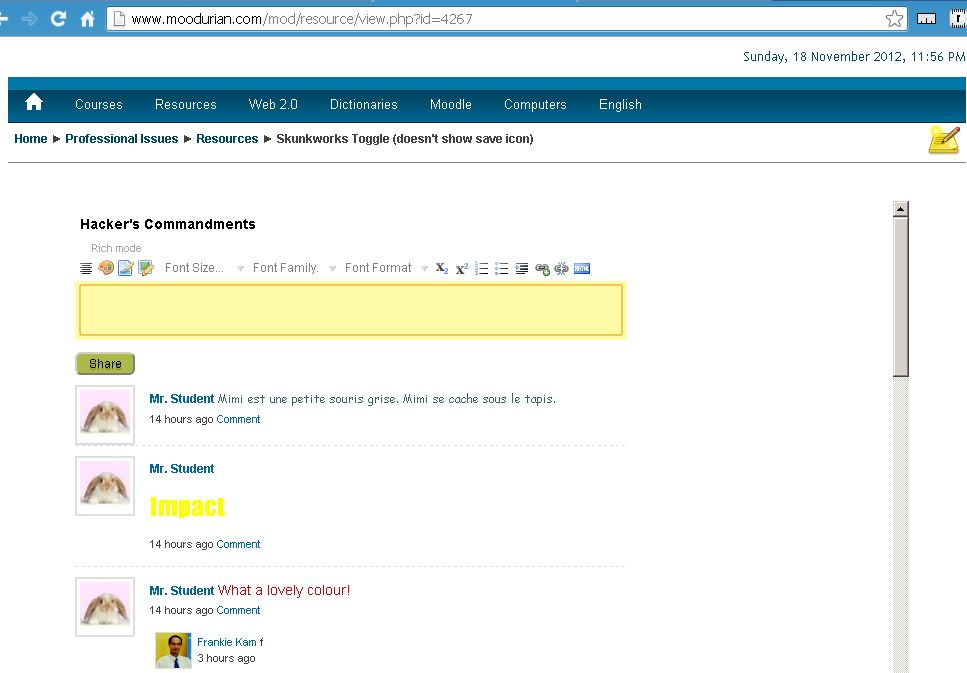
Here's my latest work on the WunderbarWall, erm, I mean, WonderWall for Moodle 1.9. Moodle 2.x users, please be patient. I haven't yet ported over the code. Latest version of the Wall is as shown below in these three images. Now with the Nicedit integration into the WonderWall, you can do straight copy and paste from websites and the multmedia updates can be posted directly onto the Wall.


Everyday, I'm shufflin' toggling!

I figured out to integrate Nicedit with Moodle and to toggle between Nicedit's rich editor and HTML's humble and under-rated Textarea.

Figure 1. Nicedit Rich Text editor integration.


Figure 1. Toggling  between the Nicedit Rich Text editor
and the normal standard HTML Textarea.


Figure 3. The Wall allows you to copy-and-paste media rich content from
other websites. Again, this is possible thanks to Nicedit. Not bad for
a rich text editor (2009) that is no longer in development!

So what are you waiting for? Head over to my Moodle production site for a live demo:
http://www.moodurian.com/mod/resource/view.php?id=4267
Username: studentscm
Password: studentscm


Grafitti Wall

Finally for today, I created a Grafitti Wall on my Moodle site. You can use the Nicedit editor to post creative updates to my Grafitti Wall. Please be gentle and be mindful to post only polite messages!

http://www.moodurian.com/mod/resource/view.php?id=4268

Username: studentscm
Password: studentscm

Figure 4. Check out the Grafitti Wall. 

Now that's what I call art!

Figure 5. The Rich Editor allows you to post colorful
messages onto the Wall. Go ahead, try your hand
at creative sentences and words.

Figure 6. The Wall also features special Gafitti Fonts
that you can use to spice up the Wall!


If you are interested to have a Wonder/WunderbarWall installed on your Moodle 1.9 / 2.x production site, just send me an E-mail. Code and installation charges apply.

Frankie Kam

Ratings and Recommendations by outbrain