Pages

Showing posts with label social. Show all posts

Monday, August 26, 2013

Facebook-like Wall For Moodle 1.9x and 2.x is now freely available as Open Source to the Community

Image by Troy Tolley. Creative Commons
Attribution-NoDerivs 2.0 Generic. See Source.
Facebook-like Wall code for Moodle. I'm releasing the code for free to the Moodle community as GNU General Public License (GPL). That's right, you can use it and modify it feely, but in your code, please credit the main authors, Srinivas Tamada and Frankie Kam.

What's the method to my 'madness' of giving a portion of my hard work away for free? I'm giving the code to the community is to see a better Wall emerge from the Crowd of Moodle developers or students or users. Please take the Wall code to new heights for the benefit of the Moodle worldwide community. Be brave, be gentle, be innovative, be creative. Cheers!


The Wall in action on my Moodle 2.5 site.
There's also a Moodle 1.9 version.
Both are free - NOW.

It's been fun developing the Srinivas' Tamada's original non-Moodlerised Wall script 3.0 to where it is now, but now it's time for the rest to take over with the coding of the Moodle Wall. Please make it jump though hoops. Perhaps you can make the Wall posts update in realtime using AJAX. I couldn't. Perhaps you can improve the GUI of the Wall. I haven't got the time. Please share it back to the Moodle Community.

Have fun!

Wednesday, August 21, 2013

Learn Geography with Alex Little's Online Users Map block for Moodle 2.x

Source:  PikiWiki - Israel free image collection project
This is one great block to show off to your users! Alex Little's Online Users Map block for Moodle 2.x.

Figure 1. Online Users Map using
OpenStreetMap set to on.

After installing in click on Site Adminisration | Notifications. Then go to Administration | Site Administration | Plugins | Blocks | Online Users Map. Here is a subset of settings:

Wednesday, August 14, 2013

Find out which activities are popular on your Moodle site with the Recommender Block for Moodle 2.3 and above


I love any Moodle plugin that makes the Moodle site more social, more fun, more human-friendly. So, when I stumbled across the Recommender Block, I knew I had to try it out.

The Recommender block was created by Lancaster University Network Services Limited. it allows you to look at the most recent activity by other users of this website. You can view the most popular resources and activities that have been viewed and, if appropriate, participated in within the website.

If you click on the ‘Popular activities and resources’ link below you will see the top three results (you can click on these titles to take you directly to the resource or activity listed) and a ‘more’ link where you can access a page where all the results for this website will be listed. You will be able to filter the results by date range, item type, and by the number of views and participation. Source: Help option on the Recommender Block

In other words, you can now find out at a glance, which Moodle activities or resources are popular on your site. Here's what it looks like on my site.
Here's what the block looks like


Friday, February 8, 2013

Making Moodle more SOCIAL and FUN.

Making Moodle More Social and Fun

I presented this at University Malaya on Thursday 7th February 2012. Hope you enjoy the tips.


Thanks for viewing. Any comments?

Frankie Kam

Wednesday, February 6, 2013

Liven up the Participants List (People Block) in Moodle 2.4 by changing the City field into Hobby

How would you like to have a Hobby field show up in the Participants List in Moodle 2? Well it can be done! Charles Kelly of http://www.manythings.org had shown how it could be done in Moodle 1.9  here. The purpose of my blog post today, is to show you how to do it for your Moodle 2.x (tested on 2.4) site. I had previously blogged about doing the hack for Moodle 1.9 post here. The good news is that it's easier to do this for Moodle 2.x.
What’s the benefit of doing this? In my humble opinion, knowing that you come from Wellington or Kuantan is not as interesting as knowing that you have a liking for Psy, Bradfort City Football Club or rearing Beagle pups. How can we do this? In Moodle 2.x, you just need to do one mandatory step.
  • Firstly, change the City field’s display name to “Hobby / Interest / Free Time”.
  • Secondly (this step is optional), modify the length of City field from an already generous 120 characters to N characters.
Figure 1. What the Participants List looks like. Note that some users had earlier typed their City data since I only recently implemented the hack.

Thursday, January 10, 2013

Here it is - my FREE Limited-Features Version of the Wall for Moodle 2.x

Dear All
I am releasing a free version -and- limited-features version of the wall for Moodle 2.x. This wall has been tested under Moodle 2.2. You can download it, try to install it. If you succeed, you are a Moodle-PHP Guru. If not, you can always E-mail me, right?  If you successfully set it up on your Moodle site, you are free to modify or customise it. This wall is a modification of Srinivas Tamada's Facebook-like Wall Script 3.0 which is free.


Wednesday, October 3, 2012

Where's Wally? Add a Facebook-like wall to your Moodle 1.9 coursepage!

My latest project.

A Facebook-like wall on your Moodle front coursepage. Here's what it looks like on my Moodle 1.9.15 production site.


WHY build one for your Moodle site?
  1. It's FUN!
  2. It's more PERSONAL!
  3. It's great for scrolling on MOBILE DEVICES like smartphones and tablets
  4. It's like Facebook and I haven't yet met a student who didn't like Facebook
  5. It can function as a forum discussion thread
  6. It allows students to collaborate asynchronously
  7. It brings a Web 2.0 dimension into good-ole'- clunky-Moodle1.9-2.x
  8. It allows you to enbed videos fro Youtube and Vimeo (yeah!)
  9. It allows auto URL linking
  10. WHY NOT?????
In case you and your students find the wall too distracting, you can also configure the Wall as a collapsible Accordian resource object. For example, on my production site, I can click the green cube icon to expand the Wall. See the image below. Goodbye distracting wall, hello clickable green icon.


Here it is!


HOW TO BUILD IT

Your starting point to build a Facebook-like wall is here at Srivinas Tamada's website with the stock zip file here. If you follow the installation instuctions, you will end up with a Wall that looks like this.


The problem with the wall above is that I could only display my own updates, and not updates from others. In addition, the Wall requires me to hardcode my Google email address into a file so that the Wall can retrieve my Gravatar icon. The script has room to create a separate login.php file that allows the user to login in with a username and password. But that would mean that the user has to first login with his or her Moodle username and password, and then login with another set of username-password data to use the wall.

The good news is that I've modified Srivinas' Facebook wall script 3.0  for instant login with your Moodle login account. Plus a few other features which you won't find in the stock zip file. In other words I've spent N hours customising it for Moodle 1.9 use. In another post, I'll tackle a Moodle 2.x version of the code. Since Srivinas' code is written for a generic LAMP website, I am sure that it can be coded to run in a Moodle 2.x environment. For Moodle 2.x it'll may take more than a few tweaks since the user table name may differ.

Working demo:
Username: studentscm
Password: studentscm
http://www.moodurian.com/course/view.php?id=39

Discussion on this Wall's development: http://moodle.org/mod/forum/discuss.php?d=197229
For a pedagogical and an interesting academic discussion of the use of a Wall and Facebook with a Moodle site: http://moodle.org/mod/forum/discuss.php?d=212705


IN closing, here's a list of features that I have added on to Srinivas' Facebook Wall Script 3.0:
  1. The wall is ready to be integrated into your Moodle production site.
  2. The wall is now multi-user. Any number of coursepage participants can post on the same wall.
  3. You can paste in TED video links and they will expand
  4. No more double Youtube video bug (solved that pesky bug)
  5. Shows Firstname and Lastname instead of userid
  6. Compatible with Mozilla Firefox and Google Chrome - no more CSS issues (on my PC at least!)
  7. Wiggly icons!!! Nice effect that one.
  8. You can add some text before the Youtube http link and both the text and youtube embed video will  be posted on the wall.
  9. Videos embedded in the wall can be viewed by iOS and Android devices.
  10. The Moodle course administrator can delete others' posts and comments directly off the wall
  11. I have managed to allow the single Wall to be shared among any number of coursepages. With each coursepage loading a different view or subset of the wall. We're talking about a single comments table and a single messages table being used by N number of coursepages. Each coursepage displays only the messages and comments posted by participants of the coursepage.
  12. Using an iframe embed code, I can add a wall as any type of Moodle resource. A label, a webpage resource, an Accordian resource.
  13. The user's name is a live link that shows the Moodle user's profile tab when clicked.
Plans for the future:
  1. Allow users with teacher roles to delete messages and comments of students and users.
  2. Integrate the impressive-looking Facebook Wall Script version 5.0 (commercial version) with Moodle integration code so that what I have done with Version 3.0, I can duplicate the same made-for-Moodle features,
  3. Adapt the code for Moodle 2.3 and above!
  4. To tell you the truth, I think that it's very possible to even create separate walls not just for separate coursepages, but for separate resources within separate coursepages. I believe that this is possible because each resource in Moodle (be it a forum, book, label etc) has its own id=value. So just like where you can have various forums in each coursepage, you can actually (I believe strongly) have separate (virtual) walls for each coursepage. ALL THIS FROM JUST ONE messages TABLE AND JUST ONE comments TABLE!
Interested to know more? Email me at boonsengkam@gmail.com

regards
Frankie Kam

Monday, June 11, 2012

Liven up the Participants List by changing the City field into Hobby

How would you like to have a Hobby field show up in the Participants List in Moodle 1.9? Well it can be done! Charles Kelly of http://www.manythings.org has done it and in this blog post I will show you how.

Why should it be done? In my humble opinion, knowing that you come from Melaka or Kansas City is not as interesting as knowing that you have a liking for Pink Floyd, Manchester City Football Club or body building. How can we do this? Two steps. First: change the City field's display name to "Hobby / Interest / Free Time". Secondly, modify the length of City field from a measly 20 characters to a generous 100 characters.


Doug Moody's Album blockalbum.php for Moodle 2.2.

Yesterday, Doug Moody shared a php file on this Moodle.org discussion thread. Doug's file displays user pictures by group. It is based on the index.php script in the userpix directory. It can also display the user images pictures up to 200 pixels and display the names of each student under each image. The code is useful for creating a class album, or a picture book.
"I teach 12 classes, and wanted to put together a picture book that would break out the classes separately. It is fantastic to help students get to know each other."
Place album.php in the userpix directory in your Moodle 2.2 site. Usage is as follows:
http://[site url]/[moodle directory]/userpix/album.php?group=[group name]&size=[size in pixels]

For example:
http://moodurian.com/m2/userpix/album.php?group=techs&size=64

Monday, June 4, 2012

'Motivating' users to change their default Moodle avatar in Moodle 1.9.


Do you use Moodle’s default user icon (avatar), or have you substituted it with an icon of your choice? In this post, I will talk about what I consider, for my site, an ideal default user icon. The purpose of this post is find a way to encourage users or students to quickly change their default Moodle user icon.
In my classes, I insist that my students change their default user icons to images (faces) of themselves.  The reason for this is because, one, I got tired of looking at so many yellow smiley faces. Two, I wanted the Moodle coursepage to be a bit more Web 2.0-like in terms of having actual user faces. So, in every introductory session on Moodle, I inform my students to change their icons. There has never been much great urgency among some students to do so, especially among those who do not have a Facebook account.
However, I believe that with my discovery of a ‘different’ default user icon, I can get more students to make the change, sooner.  Intrigued? Click here to read more!
Smiley Face Cake
 'Moodle' cake recipe

Sunday, February 12, 2012

Stamp Collection module development for Moodle 1.9 and stamp icons from other Moodlers

This post is to chroncle developments to the changes I have made to David Mudrak's Stamp Collection module. This post complements these earlier ones here and here.

10/2/2012 - Added a help screen to make looking-up of Stamp icon codes easier

I've raised the bar one notch higher.
This time, the administrator can click on a help link and a
separate window will appear showing him/her the codes, the icons used and the meaning of the codes.

Students can also access the help link. This makes administering the multi-stamp collection easier for the (overworked) administrator/teacher.


Figure 1: The student can click on the Help link to know the meaning of each stamp icon.

Saturday, January 28, 2012

Giving students a feel good factor with a Stamp Collection pseudo-block (Moodle 1.9.x)

The Stamp Collection module by David Mudrak is one of my all-time favourite modules on my Moodle 1.9.15 site. It's a great tool to provide feedback to students and to reward them whenever work has been done. I like to think of it as a motivational tool.

I had always wished that there could be a block that shows the student how many stamps he or she has earned. Why? This is because at the moment, the student has to click on the Stamp Collection module to view the stamps earned. So this evening, I sat down to craft such a block. And I failed miserably because of my lack of experience in PHP coding!

Undeterred, I had a brainwave of how I could achieve the same effect as a real block. Within 4 hours, I crafted something that made use of David's existing code, HTML, PHP and some tricks. Here's what it looks like:


So the advantage of this 'block' is that the student can see his Stamp collection. Is it growing? Is it stagnant?

Friday, January 27, 2012

Giving students a feel good factor with the Online Users block (Moodle 1.9.x and Moodle 2.2)

Fourteen days ago, I set out to modify Andy J. Davis' Online Users block. My objective was to make my Moodle site more engaging. I think that with the generous help of PHP developer, Matteo Scaramuccia of Italy, and Stephane Gully's Shoutpro Creative Commons Attribution-ShareAlike 2.5 License code,  the objective has been achieved.


Wednesday, January 18, 2012

Online Users block (Part III) Feeling moody? Show off your mood.

WHAT IF you could display your mood or status on the Online Users block by Andy J. Davis? Imagine with me if you will.

You're on your Moodle coursepage. Just before you go to make phone call, you display a BRB (Be Right Back) status next to your username on the block. Or before you attempt a quiz for the next one hour, you display a Busy status for the world to see.


Well, I've done it on my Moodle site, and so can you.

Monday, January 16, 2012

Online Users block (Part II) - Invisible and Visible Users

In my previous post on the same subject here, I  showed how a user's avatar and username could be made to disappear from the Andy J. Davis' Online Users block. The problem with that feature is that everyone in the online class could opt to be come invisible. If so, then it would be difficult for the administrator or teacher of the course to know exactly how users many had gone invisible on the coursepage.

I have since updated the block to allow the Administrator to see how many visible and invisible users are currently accessing the Moodle site. A teacher who is not an Site administrator, but is  teacher of the course and also a course administrator can also be given the same privileges. Take for example, the image below:


A Student user who has gone invisible
Here we find that Mr Smiley Face is a student who has opted to make himself invisible. He is able to see other students' avatars as long as they did not themselves choose to be invisible. 


Image 1: One invisible lurker
and one visible user. 

Mr Smiley Face student does not, however, know how many lurkers exist on the Moodle coursepage site. For all he knows, he might be the only lurker around. Or, he could be one of ten others lurking around the site.

Saturday, January 14, 2012

Online Users block (Part I) - How to be invisible on the Online Users block. A Moodle 1.9.x and 2.x solution

Learning Outcome: at the end of this post, you will know how to allow your Moodle 1.9.x and 2.x users to hide themselves on the Online Users block. This is Part I out of two parts. You can read Part II here.

Now I don't know about you, but I like, no, LOVE, the Online Users block by Andy J. Davis. It lends an air of Web 2.0 for Moodle. The feeling of a learning community that the block helps to foster is priceless. This block is useful for students and teachers to know who is online.


Figure 1: Online Users block.
A Moodle core block.


Thursday, January 5, 2012

What video inspires you?

Hi. Watched any inspiring videos lately? 


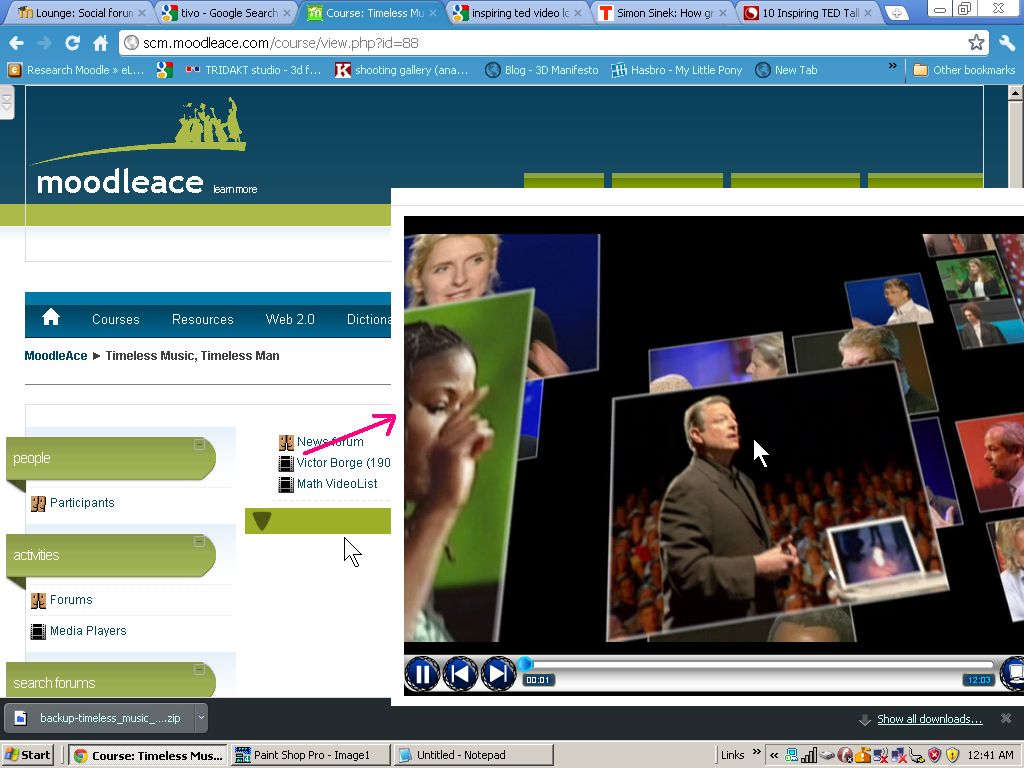
I trying to build a list of inspiring videos to share with my students. To watch them on my Moodle site, I really enjoy using Matt Bury's Media Player plugin to create a video playlist for my students to watch videos (of my choice). It's really versatile.

You can play the videos from my Moodle website here by using Guest access. 
The playlist is created from an XML file that I edit using Windows Notepad. Here's an example of a XML playlist file. And here's another one

Wednesday, December 21, 2011

Wiggly icons on your Moodle site to liven up the interface

Here's a Moodle first I think. First in the WORLD.

I've made use of Dynamic Drive's Shake Image Script to make the images, avatar icons and activity icons on my Moodle 1.9.15+ site go all wiggly. This is my innovation to make the Moodle interface more interesting and visceral.

Demo site:
http://www.moodurian.com
Username: student
Password: sudent

If you move your mouse cursor over your avatar's icon, it will come alive...I mean, wiggle.

The window below is LIVE. Do a mouseover on any one of the blue round icons.


See what I mean? Good.

Below is a screenshot not a live window. Just in case you didn't know.


Saturday, October 8, 2011

Cleverbot for students studying English. Comes with ASR. What's that?

A big thanks to Nicholas Walker for introducing me to the subject of virtual characters and chatbots. Cleverbot is one clever robot. But try convincing Cleverbot that he is a robot and you might be facing a stiff fight, er.. I mean conversation.


Launched on the Web in 1997. 65 million conversations since then. Judged to be 59.3% human in the 2011 Turing Test, far exceeding AI experts' expectations, as the humans in the same event "achieved just 63.3%" (Wikipedia). Cleverbot is one impressive piece of software.

Available on the Web with text synthesis and voice recognition, Cleverbot has been mimicking human conversations with uncanny accuracy for more than a decade. Cleverbot is also available on iOS and Android (with a spoken voice!).

Ratings and Recommendations by outbrain