Pages

Showing posts with label motivation. Show all posts

Monday, June 4, 2012

'Motivating' users to change their default Moodle avatar in Moodle 1.9.


Do you use Moodle’s default user icon (avatar), or have you substituted it with an icon of your choice? In this post, I will talk about what I consider, for my site, an ideal default user icon. The purpose of this post is find a way to encourage users or students to quickly change their default Moodle user icon.
In my classes, I insist that my students change their default user icons to images (faces) of themselves.  The reason for this is because, one, I got tired of looking at so many yellow smiley faces. Two, I wanted the Moodle coursepage to be a bit more Web 2.0-like in terms of having actual user faces. So, in every introductory session on Moodle, I inform my students to change their icons. There has never been much great urgency among some students to do so, especially among those who do not have a Facebook account.
However, I believe that with my discovery of a ‘different’ default user icon, I can get more students to make the change, sooner.  Intrigued? Click here to read more!
Smiley Face Cake
 'Moodle' cake recipe

Friday, April 6, 2012

Enhancing David Mudrak's Stamp Collection Module for Moodle 2.2! Multistamps and Pseudoblock Stamp display.

Awarding Stamps in David Mudrak's Stamp Collection Module for Moodle 2.2 just got better!

4/4/2012 - I managed to enable Multi-Stamp awarding in the Stamp Collection Module for Moodle 2.0!!


Read all about it here and on (coming soon) Moodlenews.com.
The code for Moodle 2.2 will be published real soon. Wait for it.

Monday, March 19, 2012

Sending an E-mail notification to a student in David Mudrak's Stamp Collection module for Moodle 2.2!


I've discovered how to send an E-mail notification for David Mudrak's Stamp Collection module for Moodle 2.2. It's really easy. All you need to do is to copy this code: 

Saturday, March 17, 2012

You've got a Stamp! Sending a E-mail notification to a student each time a Stamp is awarded (in Moodle 1.9)

On my drive home from work yesterday afternoon, I had a brain-storm. I thought to myself: "Why can't the Stamp Collection module for Moodle 1.9.x, created by David Nudrak, have its own built-in E-mail notification system?". After all, wouldn't it be useful for students to receive an E-mail from the teacher each time a stamp was awarded?


(Photo credit: Mzelle Biscotte via Flickr.com under the 
 

Sunday, February 12, 2012

Stamp Collection module development for Moodle 1.9 and stamp icons from other Moodlers

This post is to chroncle developments to the changes I have made to David Mudrak's Stamp Collection module. This post complements these earlier ones here and here.

10/2/2012 - Added a help screen to make looking-up of Stamp icon codes easier

I've raised the bar one notch higher.
This time, the administrator can click on a help link and a
separate window will appear showing him/her the codes, the icons used and the meaning of the codes.

Students can also access the help link. This makes administering the multi-stamp collection easier for the (overworked) administrator/teacher.


Figure 1: The student can click on the Help link to know the meaning of each stamp icon.

Saturday, January 28, 2012

Giving students a feel good factor with a Stamp Collection pseudo-block (Moodle 1.9.x)

The Stamp Collection module by David Mudrak is one of my all-time favourite modules on my Moodle 1.9.15 site. It's a great tool to provide feedback to students and to reward them whenever work has been done. I like to think of it as a motivational tool.

I had always wished that there could be a block that shows the student how many stamps he or she has earned. Why? This is because at the moment, the student has to click on the Stamp Collection module to view the stamps earned. So this evening, I sat down to craft such a block. And I failed miserably because of my lack of experience in PHP coding!

Undeterred, I had a brainwave of how I could achieve the same effect as a real block. Within 4 hours, I crafted something that made use of David's existing code, HTML, PHP and some tricks. Here's what it looks like:


So the advantage of this 'block' is that the student can see his Stamp collection. Is it growing? Is it stagnant?

Friday, January 27, 2012

Giving students a feel good factor with the Online Users block (Moodle 1.9.x and Moodle 2.2)

Fourteen days ago, I set out to modify Andy J. Davis' Online Users block. My objective was to make my Moodle site more engaging. I think that with the generous help of PHP developer, Matteo Scaramuccia of Italy, and Stephane Gully's Shoutpro Creative Commons Attribution-ShareAlike 2.5 License code,  the objective has been achieved.


Friday, January 20, 2012

The Human mod - the best Moodle mod of all

How many of us teachers and educators can teach effectively without the use of an LMS like Moodle, an LCD projector and a PowerPoint slide? Not many of us I would think. For one, a teacher needs to know his or her stuff. He (or she) should be able to hold an audience's attention with minimal technical help.


A great speaker


Simon Sinek in action in 2009 at TEDxPuget Sound.
Someone forgot to bring the laptop and the PowerPoint presentation.  

Wednesday, January 18, 2012

Online Users block (Part III) Feeling moody? Show off your mood.

WHAT IF you could display your mood or status on the Online Users block by Andy J. Davis? Imagine with me if you will.

You're on your Moodle coursepage. Just before you go to make phone call, you display a BRB (Be Right Back) status next to your username on the block. Or before you attempt a quiz for the next one hour, you display a Busy status for the world to see.


Well, I've done it on my Moodle site, and so can you.

Monday, January 16, 2012

Online Users block (Part II) - Invisible and Visible Users

In my previous post on the same subject here, I  showed how a user's avatar and username could be made to disappear from the Andy J. Davis' Online Users block. The problem with that feature is that everyone in the online class could opt to be come invisible. If so, then it would be difficult for the administrator or teacher of the course to know exactly how users many had gone invisible on the coursepage.

I have since updated the block to allow the Administrator to see how many visible and invisible users are currently accessing the Moodle site. A teacher who is not an Site administrator, but is  teacher of the course and also a course administrator can also be given the same privileges. Take for example, the image below:


A Student user who has gone invisible
Here we find that Mr Smiley Face is a student who has opted to make himself invisible. He is able to see other students' avatars as long as they did not themselves choose to be invisible. 


Image 1: One invisible lurker
and one visible user. 

Mr Smiley Face student does not, however, know how many lurkers exist on the Moodle coursepage site. For all he knows, he might be the only lurker around. Or, he could be one of ten others lurking around the site.

Saturday, January 14, 2012

Online Users block (Part I) - How to be invisible on the Online Users block. A Moodle 1.9.x and 2.x solution

Learning Outcome: at the end of this post, you will know how to allow your Moodle 1.9.x and 2.x users to hide themselves on the Online Users block. This is Part I out of two parts. You can read Part II here.

Now I don't know about you, but I like, no, LOVE, the Online Users block by Andy J. Davis. It lends an air of Web 2.0 for Moodle. The feeling of a learning community that the block helps to foster is priceless. This block is useful for students and teachers to know who is online.


Figure 1: Online Users block.
A Moodle core block.


Thursday, January 5, 2012

What video inspires you?

Hi. Watched any inspiring videos lately? 


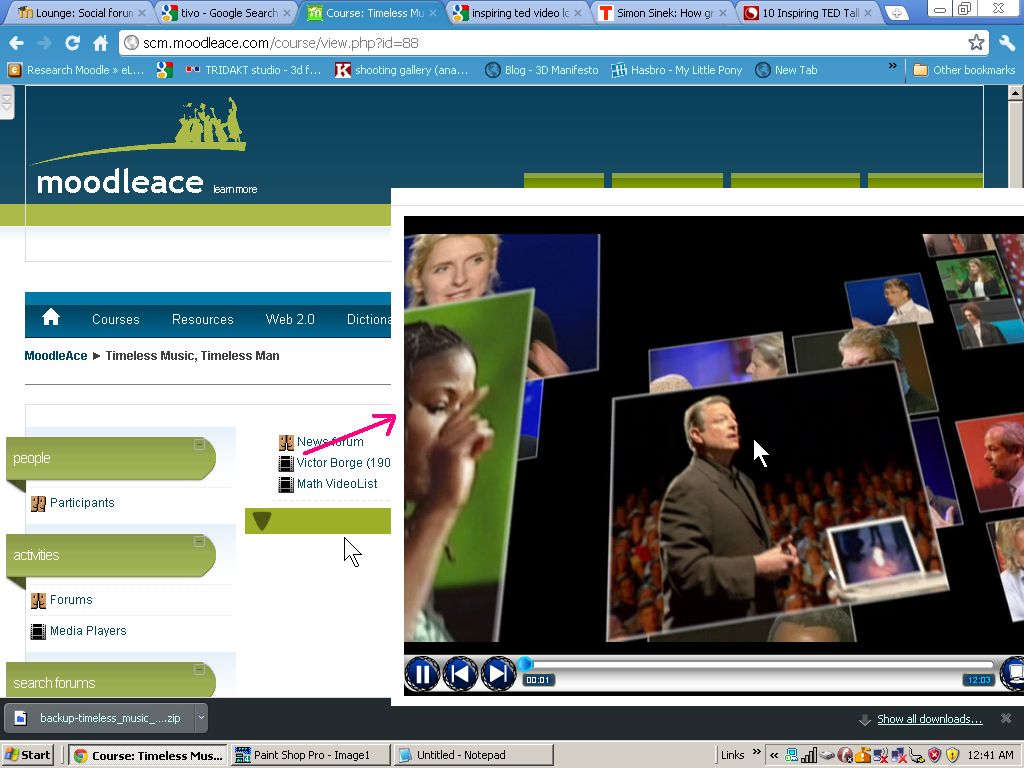
I trying to build a list of inspiring videos to share with my students. To watch them on my Moodle site, I really enjoy using Matt Bury's Media Player plugin to create a video playlist for my students to watch videos (of my choice). It's really versatile.

You can play the videos from my Moodle website here by using Guest access. 
The playlist is created from an XML file that I edit using Windows Notepad. Here's an example of a XML playlist file. And here's another one

Tuesday, December 27, 2011

Nadav Kavalerchik's Spelling Bee block for your Moodle 1.9.x site

Here's one from the deep recesses of Moodle.org - a very good Spelling Bee block to challenge your English linguistic and spelling prowess.

Nadav Kavalerchik is a brilliant Isreali chap with a penchat for churning out Moodle custom code like the  Spelling Bee. If ever there were a Nobel Prize for Moodle Open Source coding, this Moodler would be a serious contender (amongst others) for the title. He has written a brilliant piece of code that is the Spelling Bee block.  Created in November 2009 and updated in July 2011.

How it works is simple. Students are presented with an English word they should hear (audio using flash) students can choose one of the three difficulty levels for words.


Screen 1: Easy Level


They are then asked to type in the word they heard and check the spelling. Pressing the "new word" button retrieves a new word from the dictionary. The block's code is based on a http://www.thefreedictionary.com/ igoogle free service. Unless your IBM's Watson, I doubt if you could score high in Nadav Kavalerchik's Spelling Bee block for Moodle.

Friday, October 7, 2011

Steve taught me to be hungry and foolish.


My tribute to Steve Jobs on http://chrisbetcher.com/2011/10/steve/

Hi Chris.

Yes, Steve will be sorely missed.

      Image by Jonathan Mak , Hong Kong


Ratings and Recommendations by outbrain