Pages

Showing posts with label MP3 Quickie. Show all posts

Friday, July 20, 2012

Add the cool MP3 Quickie Neon audio player with upload and download to your website

MP3 Quickie Neon!


Like what you see? You can demo it live here.

Features:
  • limited recoding of 20 seconds
  • uncluttered GUI with open/close sections
  • record MP3 audio of crystal-clear quality
  • playlist of server-saved MP3 files
  • upload of multiple MP3 audio files
  • download of MP3 audio files
  • tested under Google Chrome and Mozilla Firefox
  • easy to setup and to install
  • uses php, Java and Javascript

Disclaimer:

Java applet and original GUI coding by Vimas Technology Enhanced GUI (this one!) by Frankie Kam Boon Seng. If you are using this MP3 Quickie on your site, please retain the linkback logo and URL to Vimas Technology as the software is neither freeware nor open source. If you wish to overcome the 20 second recording limitation of the MP3 applet, you may purchase the full version applet from Vimas.

The MP3 Quickie is limited to 20 seconds because it harnesses Vimas Technology’s demonstration version of its Java applet. To get past the 20 second limit, you or your institution will have to come up with $400USD, plus another $300 if you don’t want to display the mandatory Vimas logo.

I do not work for Vimas Technology, but I liked the challenge of improving the GUI of their demonstration version. This is the result of my work. Feel free to contact me if you have any questions or queries.

I'd be more than happy to hear from you!

Until my next post, happy Moodling!
Frankie Kam


Friday, March 23, 2012

Taking MP3 Quickie Version 2.00 Springbok to a whole new level

This post is to document my latest idea to improve the functionality of MP3 Quickie. My latest idea is to allow the creator of an MP3, to send an E-mail to another person. The E-mail address can either be typed in, or picked from a list of E-mails of course participants (provided each student has not disabled his or her E-mail address for privacy reasons). If the E-mail address is typed in, then the recipient can be anyone whom the sender knows. Here's a prototype image of what the Quickie can look like in the near future:


A pick list is displayed. It that allows the user to select the E-mail address from a list of course participants.

Saturday, March 10, 2012

MP3 Quickie voice recorder for Moodle matures into Version 2.00, code-named Springbok

Okay, now here's what this blog post is all about. See that beauty on the left-hand side of my Moodle site?


Ladies and gentlemen, I present to you, a modern and aesthetic voice recording tool to create MP3 files on your Moodle block. MP3 Quickie Version 2.0, code-named, Springbok. The user interface is spritely, funky, lively and fun - just like the Springbok of South Africa.

Friday, September 16, 2011

MP3 Quickie Makeover - a skinnable Version 1.8

Here's what MP3 Quickie looks like now after a Graphical User Interface makeover.
Funkier, if you asked me. It comes in two flavours.

Flavor 1: with PHP File Uploader (commercial uploader with 30-day demo)


Figure 1: With PHP File Uploader.


Wednesday, September 14, 2011

MP3 Quickie - Ver1.7 now allows MP3 files downloading to AND uploading from the client computer!

Here's news on my latest work on the MP3 Quickie.

It now incorporates an upload MP3 files button and two selection lists. One selection list is unsorted to show the MP3 files stored on the server in chronological order - it functions as a MP3 playback list. The other selection list is alphabetically sorted for easy single downloading of MP3 filenames. MP3 Quickie now stands at Version 1.7 as of September 2011.


I. DOWNLOADING MP3s TO THE CLIENT

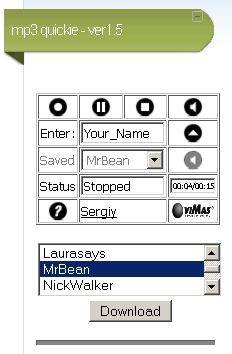
This feature was achieved with version 1.5. At the moment, you can only download MP3 files one at a time.


Figure 1: The download list allows you to download one MP3 at a time.

In earlier development phases, I was able to do multiple selections on the selection list and pass multiple filenames to the download.php file, but alas, only one file was downloaded each time. So we will have to live with single downloads until and unless I can figure out how to do multiple downloads or even download all stored MP3s as a single zipped file.

Sunday, September 11, 2011

MP3 Quickie Version 1.6 now allows you to download your saved MP3 files from the server to your client computer!

Hi there. I've just finished Version 1.6 of MP3 Quickie.


Now the recorder allows you to download your MP3 file directly off a selection drop-down box. In this version, only single downloads are allowed. So if you have 10 MP3 recordings on the server, you'll have to select each one in turn and download each one by one. Still, this is a vast improvement over Version 1.5.

Here's a screenshot:

Saturday, September 3, 2011

MP3 Quickie - a new MP3 voice recorder for Moodle 1.9 and Moodle 2.x to record 20-second "quickies"

I would like to introduce a new MP3 voice recorder for Moodle 1.9 and 2.x. Here it is, sitting pretty on my Moodle coursepage in a Moodle HTML block:


Figure 1. MP3 Quickie Version 1.0

The interface design is "original", but the main underlying code is not. More on that later in this post.

You can try the live demo here:
http://scm.moodleace.com/course/view.php?id=44
Username: student
Password: moodle

Ratings and Recommendations by outbrain