I am using Moodle 2.7.2 for one of my quizzes. I also use Justin Hunt's excellent PoodLL repositories to make "Play (Listen) Once Only" recordings that I include inside my Moodle quiz.
The repository has a play-once audio player that looks like this:
If you ever wanted to make listening-type Moodle quiz questions, then read on!
Nanogong is one of the best things to happen to Moodle. The Nanogong plugin allows you to make voice recordings on your Moodle site. You can easily post recordings in Moodle forums or as a simple label activity.
But Nanogong didn't come without its own set of problems. Although Nanogong seemed to work fine on my Moodle 2.5 site, In the past I did get constant java security warnings (Java 1.7.0_25 on my PC) - rendering it almost impossible for me to work with it.
The Beauty (Nanogong recorder for Moodle)
and the (Java) Beast
The irritating problem with java security warnings popping up everytime is a real deal-breaker when it comes to promoting the use of Nanogong. However, Nanogong is too good a plugin to not use on any Moodle site just because of some irritating and pesky pop up security warnings! So Nanogong is worth saving!
Here's the procedure to save the (your) day. Warning! Use at your own risk.
This post is about POODLL. Well sort of, because my post is obviously incomplete. I've copied inside this blog post, the contents of the POODLL filter settings of my Moodle 2.5 site. Why did I do this? Well it's simple. I finally managed to get POODLL working on my site, and I wanted to preserve the filter settings so that I can refer to them in future. You never know. When I get more time to blog about how I installed POODLL on my site, I will fill in more details.
This is one cool Moodle plugin for Moodle 2.4 and above
Today's post is on the ultra-cool tinyMCE Youtube Anywhere plugin. It allows you record a webcam video from within the TinyMCE HTML editor, and upload the resulting video direct into YouTube. Many thanks to Justin Hunt, Joseph Thibault, this Moodlenews post that got the ball rolling and the Moodle (and non-Moodle) community of contributors!
I installed in on my Moodle 2.5 site, and I would like to share some screenshots for those of you who wish to do the same. Hopefully I will succeed in whetting your appetite to have this marvelous plugin working on your site as!
Today's post is not a complete step-by-step installation guide. Here are some screenshots of the process involved to setup the plugin on your Moodle 2.4 or 2.5 site.
For more detailed information on how to create the client id and OAUTH secret codes, you can refer to this installation PDF file by Justin.
YouTube Anywhere settings
Possible alert notification from Google
I received this message because the Moodle plugin was trying to access my Goodle account. Hence I had to allow Google to recognise the server's IP address from which the request came from. I merely clicked on the http://support.google.com/mail?p=client_login link to resolve this.
The Plugin in action
1. Once you have the plugin installed on your Moodle site, click on the YT icon in your tinyMCE editor
2. A three-tabbed display appears. Click on the "Record a Video" tab.
3. Click on the "Record from webcam" button.
4. Click the "Start Recording" button.
5. Confirm the action - click the "OK" button.
6. Record away!
7. Click the "Insert" button.
8. The link is inserted. Click the Submit button to embed your video into your webpage.
8. Checking out the Playlist tab.
9. Email notification from Youtube/Google
10. Final result on my Moodle site
Very nice. I hope that this series of screenshots will motivate you to
(1) Start using Moodle 2.4 and above
(2) Install YoutTube Anywhere on your own site
(3) Start making videos and embed them directly from within Moodle
Enjoy! This plugin was a community effort and was funded by contributions. Power to the people! Incentive for the developers! A list of the contributors:
Tetsuo Kimura
StraighterLine
Waleed Jameel
Richard Oelmann
Classroom Revolution, LLC Other Contributors
Don Hinkelman
Rex Lorenzo
Jason Palmer
Daran Price
Ben Reynolds
flizotte
bessette
lindstromfredg
Julian Ridden
Roland Sherwood
Philippe Petitqueux
alfieismydog
kdc_teach1
For more information on this Crowdfunded project, click here.
Happy recording!
Frankie Kam
1st June 2013
Postscript (dated 17th October 2013)
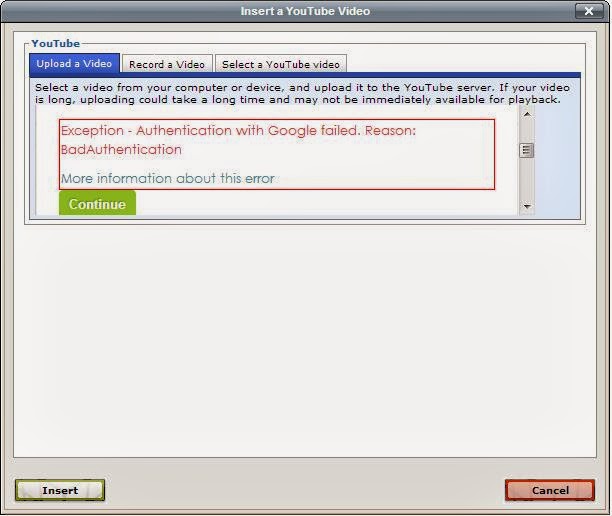
If you have enabled Google's 2-step verification for your Gmail account's password, please beware that Moodle will not be able to authenticate your account, and this is what you will see:
A dreaded message appears: "Exception - Authentication with Google failed. Reason: BadAuthentication". Clicking on the "More information about this error" leads nowhere useful.
The solution? My story is this: some months after my original post above, I enabled the 2-step verification of my Google account. Just in case it got hacked. The result? Unbeknownst to me, the Youtube Anywhere plugin could no longer be authenticated!
I was fortunate enough to discover the solution, but only after spending close to three hours(!) re-installing the plugin countless times. Initially I thought that I had broken the Youtube Anywhere code by installing too many other Moodle plugins. Then a breakthrough! In one of my Google web searches, I stumbled upon this StackOverflow post which suggested going here. Thank you Matias Molinas, whoever you are! You saved my bacon.
"If any of your customers are having trouble with ClientLogin, their account may not be compatible with it for a variety of possible reasons. For example, accounts that use 2-step verification, SAML, or Open ID are not compatible with ClientLogin.
Aha! So, Google's 2-step verification has a side-effect!
One workaround is to tell users to generate a single-use password, provided by access codes, which allows them to log in to their account in a web browser and generate a long password that they can type into the password field of any application using ClientLogin...."
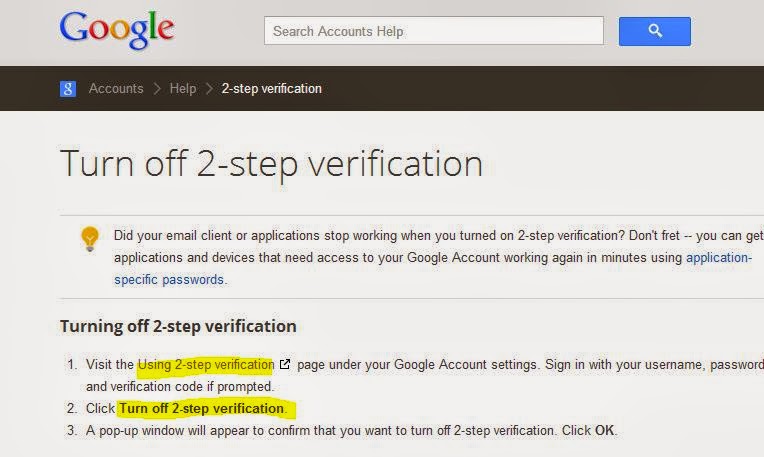
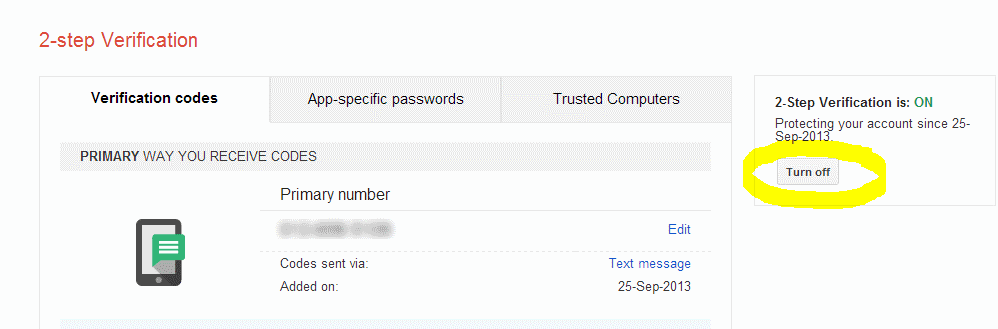
What's this "single-use password"? Never mind. No time for that. Let's just get rid of the 2-step verification then, shall we? I want to get the plugin working again on my site. I thought that I should turn off the 2-step verification of my Google account, and I surfed here:
When I clicked the "Turn Off" button, I was greeted by the next screen:
Basically, Google was suggesting that I should attempt to use an "application-specific password" instead of turning off the 2-step verification method. Since I thought that Google's 2-step verification was crucial to ensuring a decent level of security for my Google and Youtube accounts, I went ahead and clicked on the "application-specific password" link. Even though I had no idea what that meant. Fortune favours the brave! After logging into my Google account, this screen appeared:
I clicked the "Generate password" button and Google generated a password for me.
What did I do with the password? Well I went back to the Youtube Anywhere plugin's settings and entered it in the "Youtube master account password" field. Like so:
Finally, I tested the plugin one more time. It worked fine!
At last it worked.
Phew! To think that I spent 3 hours trying to figure out the problem, when all the while, the solution was out there. In the end, nothing is really 'wasted' since after countless installs of the plugin, I am now, unofficially, an 'expert' in the installation process of Youtube Anywhere. Hehe. I hope this helps someone out there ... maybe you!
Mashup: a creative combination or mixing of content from different sources.
SpeakPipe is a cool Web application that allows the readers of your blog, website, Moodle site to send voice messages instead of text feedback. If you are new to SpeakPipe, Madras Geek has written an excellent article on it here. Dorian Love also has an excellent post here on SpeakPipe.
I think that I have created a mashup of sorts by combining SpeakPipe embed code with Moodle pages. More so because I now know how to make the SpeakPipe icon appear or disappear based on the type of Moodle resource that is currently accessed by the user, or by the URL of a Moodle webpage.
Thanks to Howard Miller, I was introduced to the powerful yet humble me() function.After several hours of testing and Googling stuff, I finally got it working. Here's the code snippet of my Moodle theme's header.html file:
For Moodle we are now spoilt for choice when it comes to voice recordings. We have Nanogong, Flash AudioRecorder, MP3 Quickie and now, PipeSpeak, the newest kid on the block.
Thanks to this excellent post on SpeakPipe by Dorian Love, my blog can now receive voice recordings from anyone! To find out how you can use this clever piece of technology, read on!
Java applet and original GUI coding by Vimas Technology Enhanced GUI (this one!) by Frankie Kam Boon Seng. If you are using this MP3 Quickie on your site, please retain the linkback logo and URL to Vimas Technology as the software is neither freeware nor open source. If you wish to overcome the 20 second recording limitation of the MP3 applet, you may purchase the full version applet from Vimas.
The MP3 Quickie is limited to 20 seconds because it harnesses Vimas Technology’s demonstration version of its Java applet. To get past the 20 second limit, you or your institution will have to come up with $400USD, plus another $300 if you don’t want to display the mandatory Vimas logo.
I do not work for Vimas Technology, but I liked the challenge of
improving the GUI of their demonstration version. This is the result of
my work. Feel free to contact me if you have any questions or queries.
Thanks to this post by the prolific Moodlefairy, Mary Cooch, I've learnt about Audioboo today. It's a cool Web 2.0 free recording service with a nice interface.
It now incorporates an upload MP3 files button and two selection lists. One selection list is unsorted to show the MP3 files stored on the server in chronological order - it functions as a MP3 playback list. The other selection list is alphabetically sorted for easy single downloading of MP3 filenames. MP3 Quickie now stands at Version 1.7 as of September 2011.
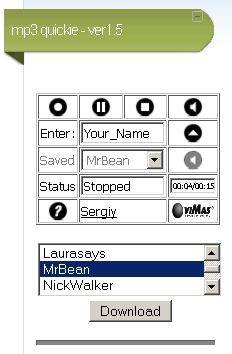
I. DOWNLOADING MP3s TO THE CLIENT This feature was achieved with version 1.5. At the moment, you can only download MP3 files one at a time.
Figure 1: The download list allows you to download one MP3 at a time.
In earlier development phases, I was able to do multiple selections on the selection list and pass multiple filenames to the download.php file, but alas, only one file was downloaded each time. So we will have to live with single downloads until and unless I can figure out how to do multiple downloads or even download all stored MP3s as a single zipped file.
Hi there. I've just finished Version 1.6 of MP3 Quickie.
Now the recorder allows you to download your MP3 file directly off a selection drop-down box. In this version, only single downloads are allowed. So if you have 10 MP3 recordings on the server, you'll have to select each one in turn and download each one by one. Still, this is a vast improvement over Version 1.5.